
Our symbol for 2025 is the interlocked finger gesture:
How to Add Your Photo to the Worldwide HSP Day Frame on Instagram
-
-
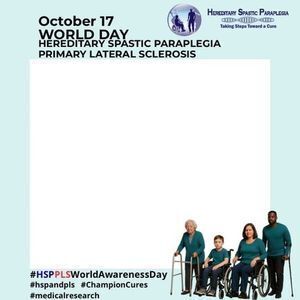 Step 1: Save the Frame
• Download/save the official HSP Day frame to your camera roll.
-
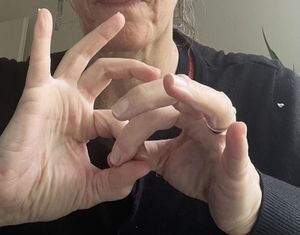 Step 2: Take Your Gesture Photo
• Make the HSP gesture:
• Chain link made of two finger loops
• Take a photo of yourself (face optional) or just of the gesture.
-
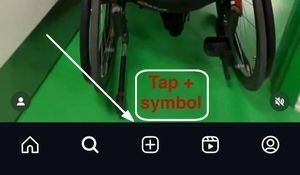 Step 3: Open Instagram
• Tap the “+” symbol at the bottom center of the screen
• Choose Story
-
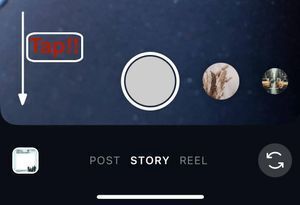 Step 4: Add the Frame
• Tap the bottom-left preview to open your camera roll.
• Select the HSP and PLS World Day frame.
-
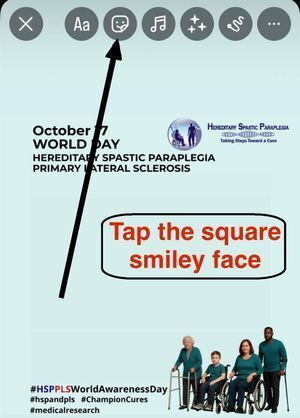 Step 5: Add Your Photo on Top
• At the top of the screen, tap the square smiley icon.
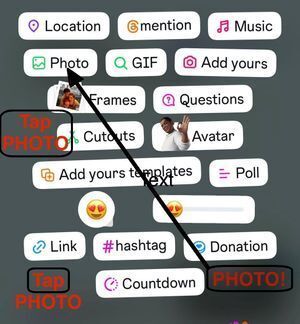
• Tap Photo.
• Select your gesture photo.
• It will appear on top of the frame.
-
-
 Step 6: Adjust & Publish
• Use two fingers to resize or move your photo until it fits.
• When you’re happy, tap the arrow in the bottom-right corner to publish your Story.
Send Your Photo to the Spastic Paraplegia Foundation
In addition to posting on Instagram, please email your gesture photo to SPF.
**Important** Name your file as: gesture.jpg
Together, we will show the strength of our worldwide HSP and PLS community.
With gratitude,
Spastic Paraplegia Foundation
